
I was updating my Games Checklist today when I noticed something horrible. Checkboxes were not rendering and list icons was still visible.
Upon investigation, MarkdownIt doesn’t do checkboxes, or checkbox lists by default. Thankfully there is a plugin for it!
Here’s what I did to get it integrated.
Grab a plugin for it. I used https://github.com/linsir/markdown-it-task-checkbox So I’ll use this as an example.
- In your terminal
npm install markdown-it-task-checkbox --save\ - Add these to your Eleventy.js starting with the import near top of file with the rest:
import markdownItCheckBox from 'markdown-it-task-checkbox';
- and this I put under Markdown library with similar calls so the file looks neater, not that many people will see it.
eleventyConfig.amendLibrary("md", mdLib => mdLib.use(markdownItCheckBox));
And that should be everything for a default quick setup, as going through some of the options there is a bit tricky.
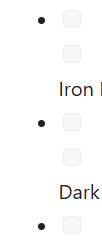
Now if you write a file with some - [ ]'s in there, you’ll notice it goes a bit weird.
My CSS fixes
/* checkbox CSS*/
ul.task-list li {
list-style: none;}
li.task-list-item input {
float: left; margin-right: 10px;opacity: 1;margin-top: 8px;}
As for the double checkboxes, that seems to be random at the moment but hasn’t come back after a few rebuilds.

Much better. And hopefully with the focused CSS targets it shouldn’t affect anything else site wide.
Here’s the page what set me off on this quick (ALL DAY!) quest.